
Best Apple Setup Accessories in 2026: iPhone, MagSafe, Camera & Mac Desk Upgrades
Apple devices are already powerful on their own, but the right accessories can completely change how they feel in daily use. In 2026, the best accessories are not just about protection. They are about building a cleaner, more efficient, and more personal Apple setup.
Instead of looking at accessories as simple add-ons, this guide focuses on real usage scenarios: keeping your iPhone slim, reducing desk wobble, improving wireless charging, shooting better mobile content, and upgrading your Mac mini or Mac Studio desktop setup.
Product source: ZEERA Wireless.

1. For Minimal iPhone Users: Go Case-Free Without Losing MagSafe
A growing number of iPhone users want a lighter, cleaner setup. They like the original iPhone design, but they still want MagSafe support, basic back protection, and better grip. This is where an ultra-thin magnetic back plate makes more sense than a full case.
Compared with a traditional iPhone case, a back plate keeps the side frame open and preserves the original hand feel. It is a good choice for users who want a case-free iPhone setup but do not want to completely give up protection.
Ultra-Thin MagSafe Back Plate Series
ZEERA MagSkin Air Ultra-Thin Magnetic Plate
- Only 0.3mm thin
- MagSafe compatible
- Preserves Air feel
- Light back guard
- Case-free carry

ZEERA MagSkin Pro Ultra-Thin Magnetic Back Plate
- Ultra-thin Pro fit
- MagSafe compatible
- Bare-phone feeling
- Camera deco guard
- Minimal daily carry

ZEERA AirFlat Lens Cover for iPhone Air
- Makes back flat
- Stops desk wobble
- Protects camera lens
- Slim matching look
- Easy clean design

2. For Desk and Car Users: Fix Heat, Cable Clutter and Charging Chaos
Wireless charging is convenient, but it is not perfect. Heat, slow charging, weak magnetic alignment, and cable clutter are still common problems. A good MagSafe charging setup should be stable, clean, and easier to use every day.
For a desk or travel bag, a foldable 3-in-1 charger saves space and reduces cable mess. For driving, an active cooling MagSafe car charger is especially useful because navigation, CarPlay, and sunlight can all make an iPhone warmer during charging.
ZEERA MagSafe Wireless Charging Series
ZEERA MagTri Gen2 Qi2.2 Foldable MagSafe Charger
- 25W Qi2.2
- 3-in-1 fold
- Active cooling
- Travel size
- 3-device ready

ZEERA MagSion 5-in-1 Dual MagSafe Charger Stand
- Dual MagSafe
- 5-in-1 stand
- Watch charging
- Angle adjust
- Clean setup

ZEERA SuVolt Gen5 Qi2.2 Active Cooling Car Charger
- 25W Qi2.2
- Active cooling
- Strong magnet
- CarPlay ready
- Heat control

3. For Everyday Protection: Choose a Case Based on How You Actually Use Your iPhone
Not every user needs the same iPhone case. Some people want drop protection. Some want a kickstand. Some want a leather or fabric texture. Others just want a clear case that keeps the original phone color visible.
Instead of choosing only by appearance, it is better to choose based on your daily habits. If you often watch videos, a kickstand case is useful. If you carry cards, a card-holder case may be better. If you want the lightest feel, a frameless or backplate-style design makes more sense.


4. For Mobile Creators: Turn the iPhone Into a More Flexible Camera
The iPhone is already one of the most convenient cameras for everyday content. But for video creators, travel shooters, and social media users, built-in camera software is not always enough. Physical filters can help control light, reflections, and image mood.
The biggest issue with many iPhone filter systems is bulk. Some require a dedicated case, a cage, or screw-on accessories. A magnetic snap-on filter system is easier for daily use because it keeps the phone closer to its normal form.
5. For Color and Personality: Make Your Apple Setup Less Boring
Many Apple accessories are either black, white, gray, or transparent. That works for some users, but not everyone wants a plain setup. Color-matched accessories can make an iPhone, iPad, or desk setup feel more personal without sacrificing function.
This is especially useful for users who want a playful Apple ecosystem: a color-block iPad case, a matching lens cover, a slim magnetic back plate, or a MagSafe case set that looks different from standard accessories.
ZEERA ColorPop Pro iPad Protective Case
- Color block
- Matte feel
- Pencil slot
- Raised edge
- Daily guard

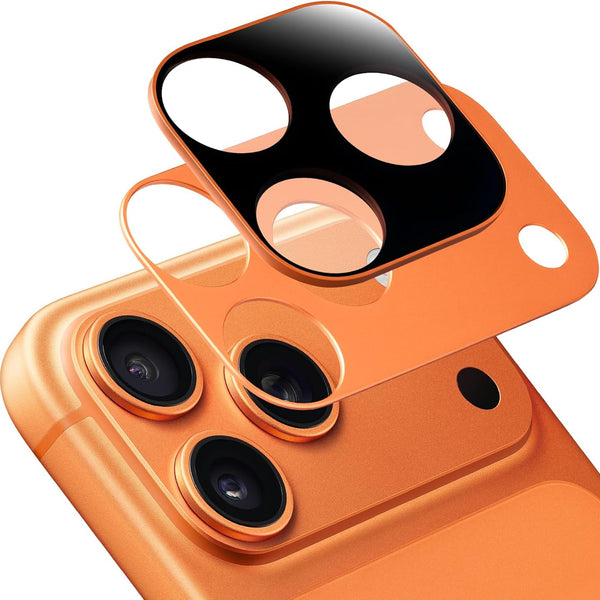
ZEERA FlatCam Deco Camera Leveling Cover
- No wobble
- Flat back
- Lens guard
- Color match
- Clean look
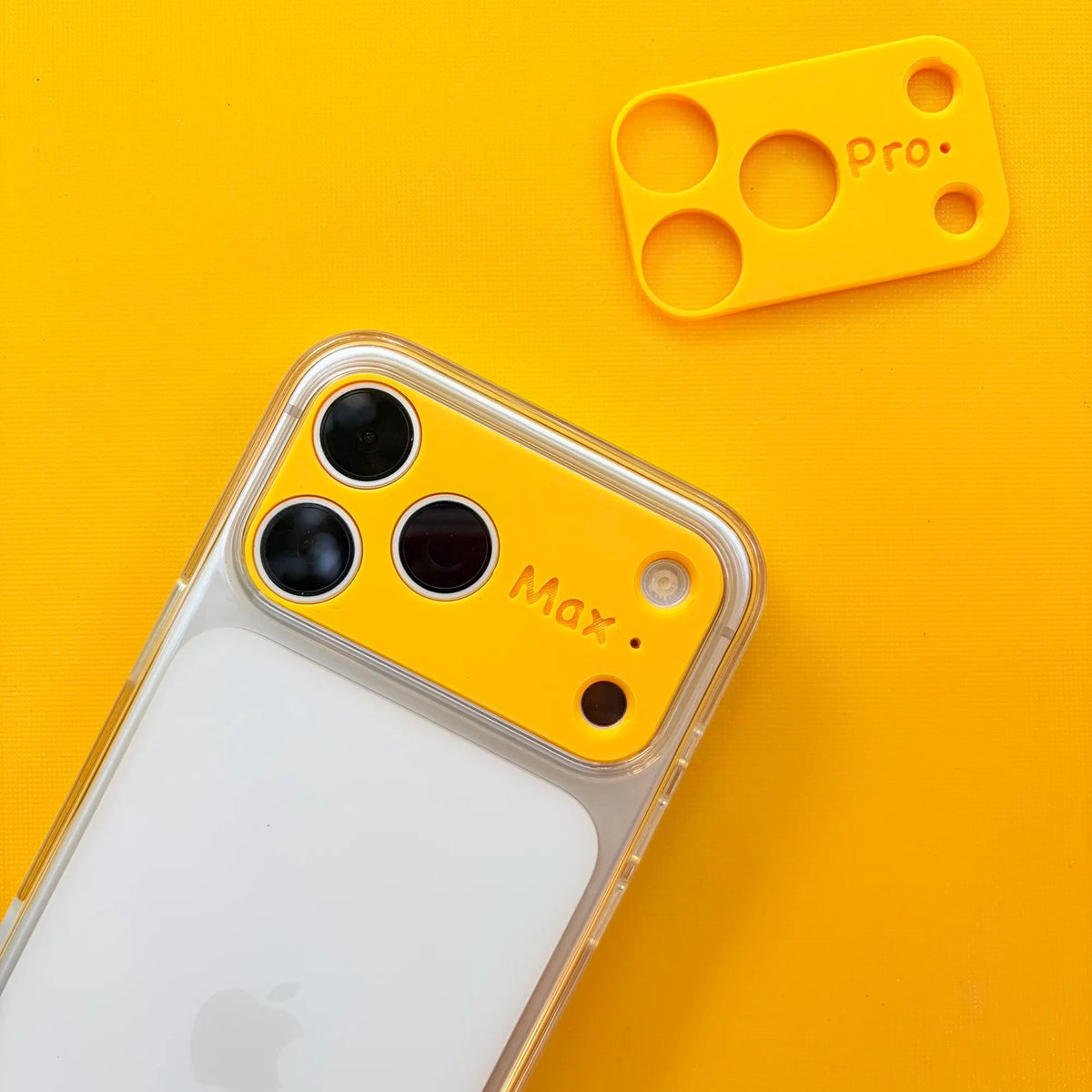
ZEERA MagPlate Eco Magnetic Back Plate
- 3D printed
- MagSafe fit
- Bare feel
- Color combo
- Slim setup
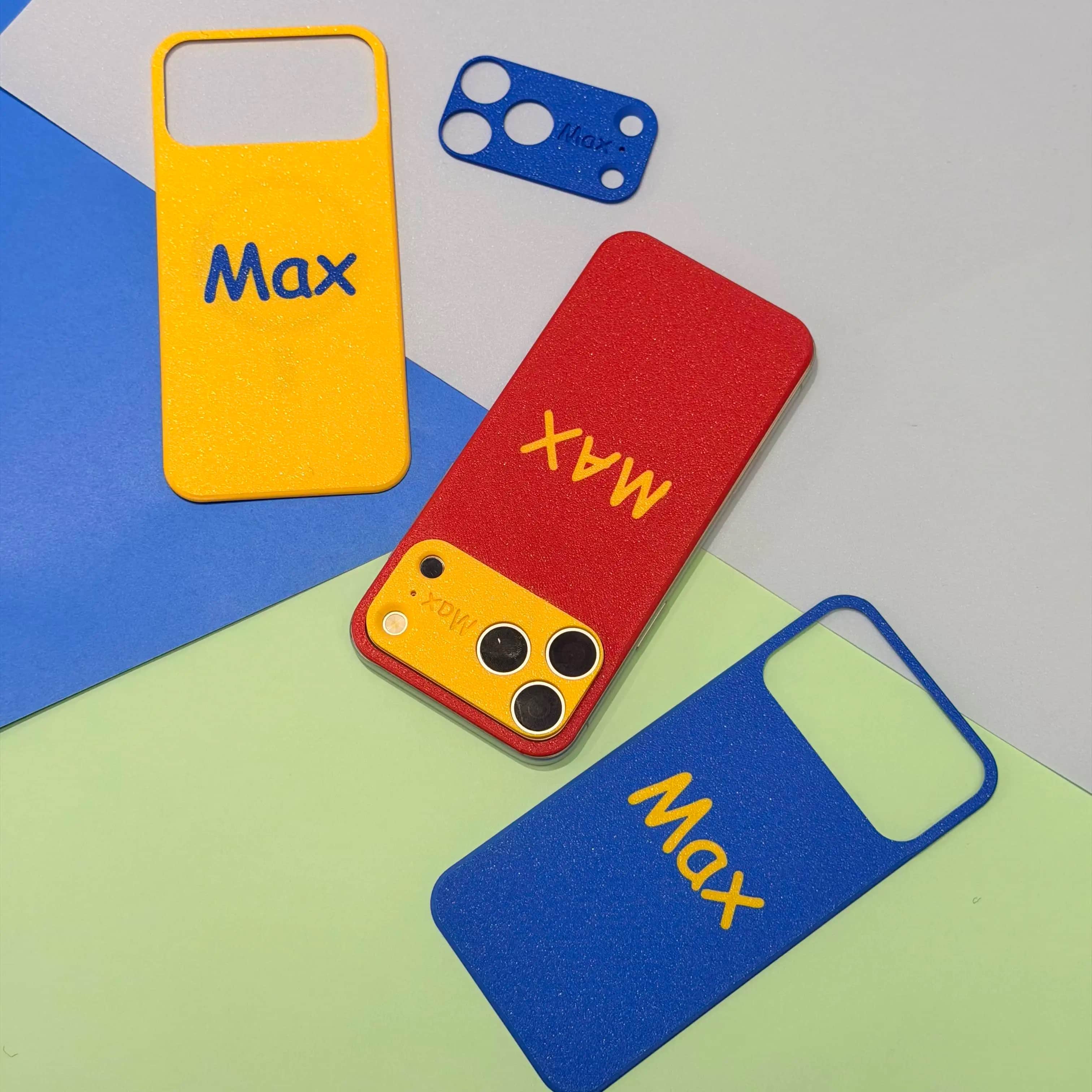
ZEERA MagPop Duo MagSafe Case Set
- Case + cover
- MagSafe ready
- Color match
- Lens guard
- Bold style

6. For Mac Users: Make Your Desk Setup Feel More Premium
The Apple ecosystem does not stop at the iPhone. If your desk includes a Mac mini or Mac Studio, the computer itself can become part of the visual setup. A premium aluminum enclosure can make a compact Mac look more intentional, especially in a creator desk setup.
For users who like the Mac Pro design language but use a Mac mini or Mac Studio, ZEERA MacForge cases offer a more professional desktop look with aluminum construction and a cleaner visual identity.
ZEERA Mac Aluminum Case Series
ZEERA MacForge CNC Mac Studio Aluminum Case
- CNC aluminum
- Mac Pro style
- Cooling grille
- Tool-free fit
- Studio guard

ZEERA MacForge Gen3 CNC Aluminum Mac Mini Case
- Mac Pro grille
- CNC chassis
- Better airflow
- SSD expansion
- Front ports

Quick Buying Guide: Match the Accessory to Your Setup
| Setup Goal | Recommended Accessory | Best For |
|---|---|---|
| Keep the iPhone slim | MagSkin back plate | Case-free iPhone users |
| Stop camera wobble | AirFlat or FlatCam cover | Desk users and note takers |
| Charge cleaner | 3-in-1 MagSafe charger | Travel and bedside setups |
| Reduce charging heat | Active cooling charger | CarPlay, navigation, and summer driving |
| Shoot better content | Magnetic camera filter | Mobile creators and travel shooters |
| Upgrade the Mac desk | MacForge aluminum case | Mac mini and Mac Studio users |
Final Thoughts
The best Apple setup accessories in 2026 are the ones that solve daily friction. A good accessory should not only look better. It should make your iPhone easier to carry, your charger easier to use, your camera more flexible, or your Mac desk setup more polished.
For most users, the smartest upgrade path is simple: start with the part of your setup that annoys you the most. If your iPhone feels bulky, try a back plate. If wireless charging gets hot, choose active cooling. If your desk looks messy, build around a cleaner charger and a better Mac enclosure.
FAQ
What are the best Apple setup accessories in 2026?
The best accessories include ultra-thin iPhone back plates, MagSafe chargers, anti-wobble camera covers, magnetic camera filters, protective MagSafe cases, and premium Mac desk accessories.
Is a MagSafe back plate better than a case?
A back plate is better for users who want a slim, case-free feel. A full case is better for users who need stronger drop protection.
Do MagSafe chargers make iPhones hot?
Wireless charging can create heat, especially during heavy phone use. Active cooling MagSafe chargers are designed to help manage that heat more effectively.
Are iPhone camera filters worth it?
They are useful for creators who want more control over glare, exposure, reflections, and cinematic image style without carrying a larger camera setup.
Should Mac mini users buy an aluminum case?
It is not required, but it can make the Mac mini setup look more premium and organized, especially for users who care about desk aesthetics.
Related Reading
Here are more ZAAP Gadget articles about upcoming Apple devices, software updates, and ecosystem upgrades.


