
iPhone 18 Pro Max Overheating After Setup? Causes, iOS 27 Heat & What to Do
Updated: August 21, 2026
Quick Answer
If your iPhone 18 Pro Max gets hot during initial setup, data transfer or an iOS 27 update, temporary heat does not automatically mean there is a hardware problem.
Apple says iPhones can become warmer during first-time setup, backup restoration, major software updates and wireless charging. A new iPhone can be doing several of these things at once.
Heat becomes more important if it is high enough to slow charging, increase processing time or temporarily pause an iCloud restore.
If you need to keep the phone powered during a long migration, active cooling can be useful. A charger such as the ZEERA SuVolt Gen5 Qi2.2 Active Cooling Car Charger is designed to charge the phone while actively removing heat from the charging area.
What Is Confirmed About iPhone 18 Pro Max Overheating?
It is important to separate confirmed iPhone thermal behavior from claims about an unreleased phone.
- Confirmed by Apple: An iPhone can feel warmer during first-time setup.
- Confirmed by Apple: Restoring from a backup can make the device warmer.
- Confirmed by Apple: Major software updates can temporarily increase device temperature.
- Confirmed by Apple: Wireless charging can make an iPhone warmer.
- Confirmed by Apple: Excessive temperature can affect charging and device performance.
- Confirmed by Apple: An iCloud restore can temporarily pause if the iPhone becomes too hot.
- Confirmed as of August 21: iOS 27 remains in beta testing, with iOS 27 beta 5 released on August 10, 2026.
- Reported: The iPhone 18 Pro Max is expected as part of Apple's September 2026 iPhone lineup.
- Not confirmed: There is currently no evidence of a widespread iPhone 18 Pro Max hardware overheating defect because the phone has not officially launched.
This distinction matters because early searches for “iPhone 18 Pro Max overheating” may refer to normal setup heat rather than a design problem.
Why Could the iPhone 18 Pro Max Get Hot During Setup?
The most likely reason is unusually heavy background activity.
A new iPhone does much more than simply copy your contacts and apps from the old device.
During initial setup, the iPhone 18 Pro Max may be performing several tasks simultaneously:
- Installing the latest version of iOS 27
- Running Quick Start
- Restoring an iCloud backup
- Downloading apps
- Syncing Photos and videos
- Syncing Messages and Mail
- Rebuilding Spotlight indexes
- Analyzing the photo library
- Restoring app data
- Processing other system data in the background
All of this can increase CPU, storage, Wi-Fi and network activity.
That means a new iPhone may feel much warmer during its first few hours than it does during normal everyday use.
Can Quick Start Make the iPhone 18 Pro Max Hot?
Yes. A large Quick Start migration can temporarily create significant heat.
The phone is not only transferring files. It can also be signing into Apple services, downloading applications and processing transferred data at the same time.
This becomes more noticeable if your old iPhone contains hundreds of gigabytes of photos, videos, messages and apps.
Quick Start can also appear to be finished before all background processing has stopped.
So if your new iPhone 18 Pro Max still feels warm after the main transfer screen disappears, Photos analysis, app downloads and system indexing may still be running.
Can an iCloud Restore Stop Because the iPhone Is Too Hot?
Yes. Apple specifically documents this behavior.
If an iPhone exceeds a certain temperature threshold while restoring an iCloud backup, iOS can display a Restore Paused notification.
The restore automatically continues after the device cools down.
This gives us an important answer to a common question:
Can heat make a new iPhone take longer to finish restoring?
Yes. If temperature becomes high enough to trigger thermal protection, the restore itself can temporarily stop.
This is also why temperature management during a very large launch-day migration can matter beyond comfort.
Can Overheating Slow iPhone 18 Pro Max Data Transfer?
Heat can indirectly increase the time needed to finish setup.
Cooling does not make your Wi-Fi router faster and it does not increase the speed of Apple's iCloud servers.
However, Apple says high device temperature can change iPhone behavior to regulate heat. Charging may slow or stop, and some workloads may operate with reduced performance.
In the most obvious example, iCloud Restore can pause entirely until the phone cools.
So the useful way to think about cooling is:
Cooling does not directly accelerate data transfer. It can help prevent excessive heat from becoming a bottleneck.
That distinction is especially important when evaluating active-cooling chargers.
Should You Charge the iPhone 18 Pro Max While Transferring Data?
Yes, especially during a large migration, but you should also pay attention to heat.
Quick Start, iCloud restoration and background downloads can consume substantial battery power.
Keeping the iPhone connected to power prevents the battery from dropping too low while those processes continue.
The downside is that charging generates additional heat.
You could therefore have several thermal loads at the same time:
iOS update + data transfer + iCloud restore + photo indexing + wireless charging.
If the phone is already warm, adding conventional wireless charging can make temperature management more difficult.
Can an Active-Cooling Charger Help During iPhone 18 Pro Max Setup?
Potentially, yes — especially when you need to charge and restore the phone at the same time.
An active-cooling wireless charger approaches the problem differently from a conventional charging pad.
Instead of simply sending power to the phone, it also attempts to remove heat from the contact area.
For example, the ZEERA SuVolt Gen5 Qi2.2 Active Cooling Car Charger combines Qi2.2 wireless charging with semiconductor active cooling.
This can be useful during a long setup because the phone can remain powered while the charger actively manages part of the additional heat produced during wireless charging.
Possible benefits during a large iPhone migration include:
- Keeping the battery powered during a long restore
- Reducing additional wireless-charging heat
- Helping maintain a more stable phone temperature
- Reducing the likelihood of temperature-related charging slowdowns
- Reducing the risk of heat contributing to an iCloud Restore pause
- Helping the phone maintain more consistent performance during sustained background processing
The ZEERA SuVolt Gen5 Qi2.2 Active Cooling Car Charger can also be used with an optional suction-cup mount, making it possible to use the charger on a desk while the phone completes a large data migration.
What it cannot do: It cannot fix an iOS bug, increase Wi-Fi bandwidth or make Apple's iCloud servers faster.
Its role is thermal management.
ZEERA MagSafe Wireless Charging Series
ZEERA MagTri Gen2 Qi2.2 Foldable MagSafe Charger
- 25W Qi2.2
- 3-in-1 fold
- Active cooling
- Travel size
- 3-device ready

ZEERA MagSion 5-in-1 Dual MagSafe Charger Stand
- Dual MagSafe
- 5-in-1 stand
- Watch charging
- Angle adjust
- Clean setup

ZEERA SuVolt Gen5 Qi2.2 Active Cooling Car Charger
- 25W Qi2.2
- Active cooling
- Strong magnet
- CarPlay ready
- Heat control

Will iOS 27 Make the iPhone 18 Pro Max Hot?
A major iOS update can temporarily make an iPhone warmer, but that is not the same as a confirmed iOS 27 overheating bug.
As of August 21, 2026, Apple Developer lists iOS 27 beta 5, released on August 10.
iOS 27 is therefore still being tested ahead of its public release.
After a major software update, the system can continue performing background work even after the installation screen has disappeared.
This may include app optimization, database updates, indexing and other processing.
If an iPhone 18 Pro Max buyer updates to a new iOS 27 build immediately after unboxing the phone and then begins a large Quick Start migration, both processes may contribute to temporary heat.
Early software releases can also contain bugs or third-party app compatibility problems.
However, there is currently no basis for saying that iOS 27 will cause every iPhone 18 Pro Max to overheat.
Why Is the iPhone 18 Pro Max Hot After Quick Start Is Finished?
Because Quick Start finishing does not necessarily mean all background work is finished.
Photos can continue analyzing images and videos.
Applications can continue downloading or restoring their own data.
Spotlight can continue rebuilding its search index.
iCloud services may still be syncing data.
This can explain why an iPhone appears idle but still feels warm and consumes more battery than expected.
The better indicator is whether the device gradually becomes cooler as this background activity finishes.
Can Overheating Damage iPhone 18 Pro Max Battery Health?
Prolonged exposure to excessive heat can shorten lithium-ion battery lifespan.
Apple specifically warns that using an iPhone in very hot conditions can permanently shorten battery life.
This does not mean a few hours of normal warmth during first-time setup will suddenly damage a new battery.
There is an important difference between:
- Normal temporary warmth during setup or charging
- Repeated excessive heat over extended periods
Still, reducing unnecessary heat during a long migration is reasonable, especially when the phone is simultaneously processing data and charging.
Does Wireless Charging Make iPhone 18 Pro Max Overheating Worse?
Wireless charging can add additional heat.
Apple itself lists wireless charging as one situation in which an iPhone may normally feel warmer.
Whether this becomes a problem depends on the total workload.
Wireless charging during normal light use is very different from wireless charging while the phone is simultaneously:
- Installing iOS 27
- Restoring an iCloud backup
- Downloading dozens of apps
- Processing thousands of photos
This is why active cooling becomes more relevant during sustained workloads than during ordinary overnight charging.
How Long Should the iPhone 18 Pro Max Stay Hot After Setup?
There is no fixed number of hours.
The amount of background work depends on the size of your backup and how much content needs to be restored.
Someone moving a small amount of data may finish relatively quickly.
A user moving hundreds of gigabytes may experience elevated activity for much longer.
The key signal is not a specific timer.
The phone should gradually cool as restoration, downloads and indexing finish.
Persistent extreme heat after those processes have finished is more concerning than heat during the initial setup period.
How Do You Safely Cool an iPhone 18 Pro Max?
If the phone becomes unusually hot during setup, reduce unnecessary workloads first.
- Keep the iPhone away from direct sunlight.
- Avoid gaming or running benchmarks during the restore.
- Avoid extended camera recording while data is syncing.
- Remove a very thick case temporarily if necessary.
- Use a stable Wi-Fi connection.
- Let background processing finish without constantly using the phone.
- If charging at the same time, consider active cooling.
Do not put an overheated iPhone in a freezer or refrigerator.
Rapid temperature changes and condensation can damage electronics.
When Is iPhone 18 Pro Max Overheating Not Normal?
Heat becomes more concerning when it persists during light use after setup has finished.
Look for symptoms such as:
- A temperature warning appears repeatedly
- iCloud Restore repeatedly pauses
- Charging repeatedly stops because of temperature
- The display repeatedly dims because the phone is hot
- The phone becomes extremely hot while doing simple tasks
- High temperature continues after background syncing has finished
- One specific app consistently causes excessive heat
- Battery drain remains abnormally high during light use
If Apple's temperature warning appears, move the phone away from direct sunlight and allow it to cool naturally.
Is iPhone 18 Pro Max Overheating a Confirmed Hardware Problem?
No — not as of August 21, 2026.
The iPhone 18 Pro Max has not officially launched, so there are no large-scale production-device results that can establish a widespread overheating defect.
The model is currently expected as part of Apple's September 2026 iPhone lineup.
Once real devices reach customers, overheating reports should be evaluated according to the conditions in which they occur.
For example:
Warm while restoring 200GB of data: potentially normal.
Extremely hot while browsing the web several days after setup: more worth investigating.
Those are two very different thermal scenarios.
What Should You Do on iPhone 18 Pro Max Launch Day?
A simple setup order can reduce unnecessary load and make overheating easier to diagnose:
- Back up your old iPhone before starting.
- Connect the new phone to reliable Wi-Fi.
- Install any required software update.
- Begin Quick Start or iCloud Restore.
- Keep the phone powered if the migration is large.
- Use active cooling if you need to charge wirelessly during the restore.
- Avoid gaming, benchmarks and long camera sessions.
- Allow Photos, apps and iCloud to finish background processing.
- Check temperature again after setup has settled.
This gives you a much better baseline for judging whether the iPhone 18 Pro Max actually has an abnormal thermal problem.
iPhone 18 Pro Max Cases for Launch Day
If you are preparing for the iPhone 18 Pro Max launch, arranging your case before transferring to the new phone can also make the first-day setup easier.


What If You Are Waiting for the iPhone Ultra?
Reports also point to Apple's first foldable iPhone joining the premium 2026 lineup.
That device is commonly referred to as the iPhone Ultra, although its final retail name has not been confirmed.
ZEERA is also preparing MagSafe-compatible protection for the expected foldable form factor.
ZEERA iPhone Ultra MagSafe Case Series
ZEERA ClearGuard Pro Crystal Clear MagSafe Case for iPhone Ultra
- Crystal-clear PC backplate
- Built-in MagSafe compatibility
- Reinforced corners
- Raised screen and camera protection
- Independent buttons

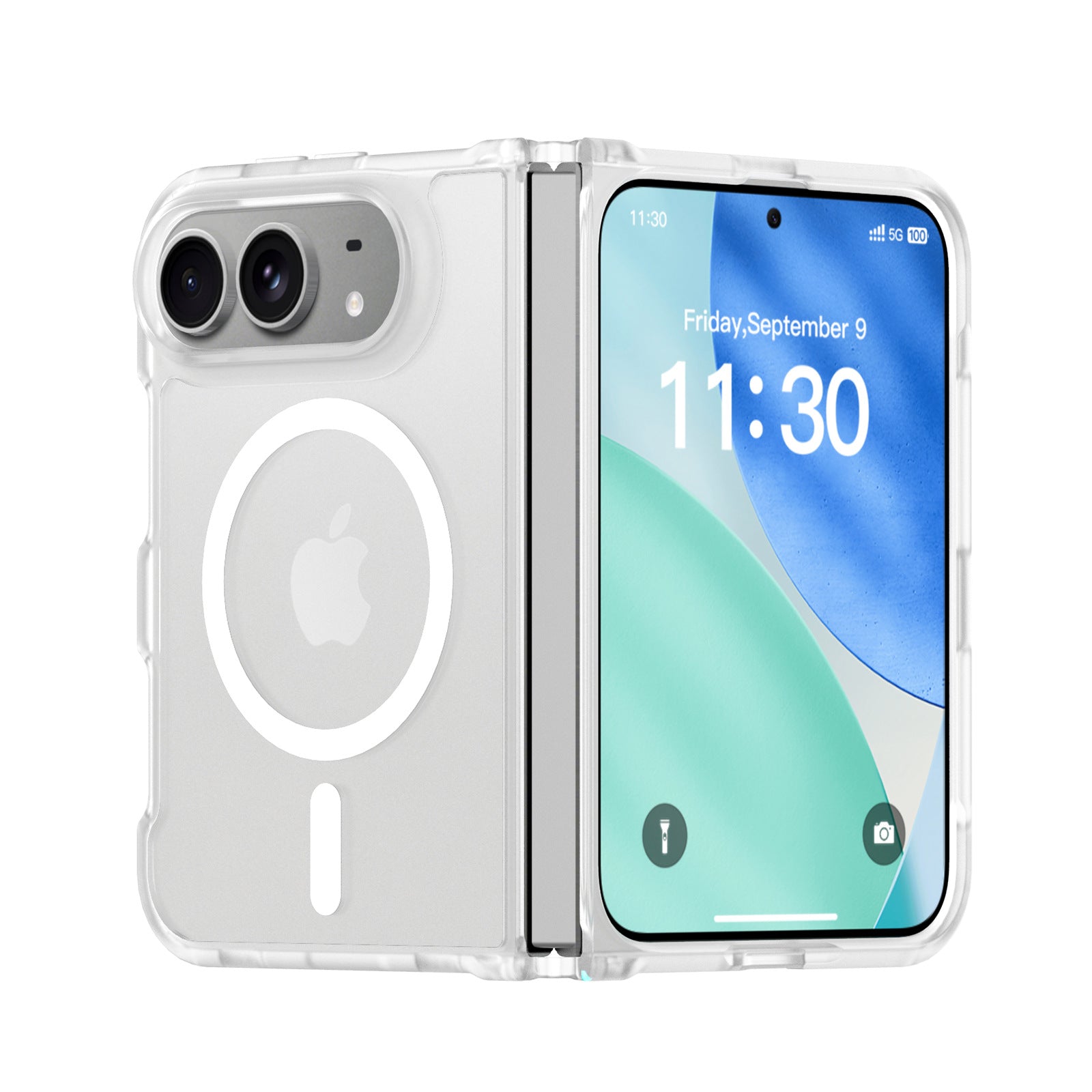
ZEERA FrostGuard Pro Matte Translucent MagSafe Case for iPhone Ultra
- Matte translucent back
- 2mm reinforced backplate
- Raised camera protection
- Flexible TPU hinge frame
- MagSafe compatible
ZEERA ColorGuard Pro MagSafe Vegan Leather Case for iPhone Ultra
- Built-in tempered glass protector
- Vegan leather finish
- Magnetic hinge protection
- Shock-resistant frame
- Built-in MagSafe magnets

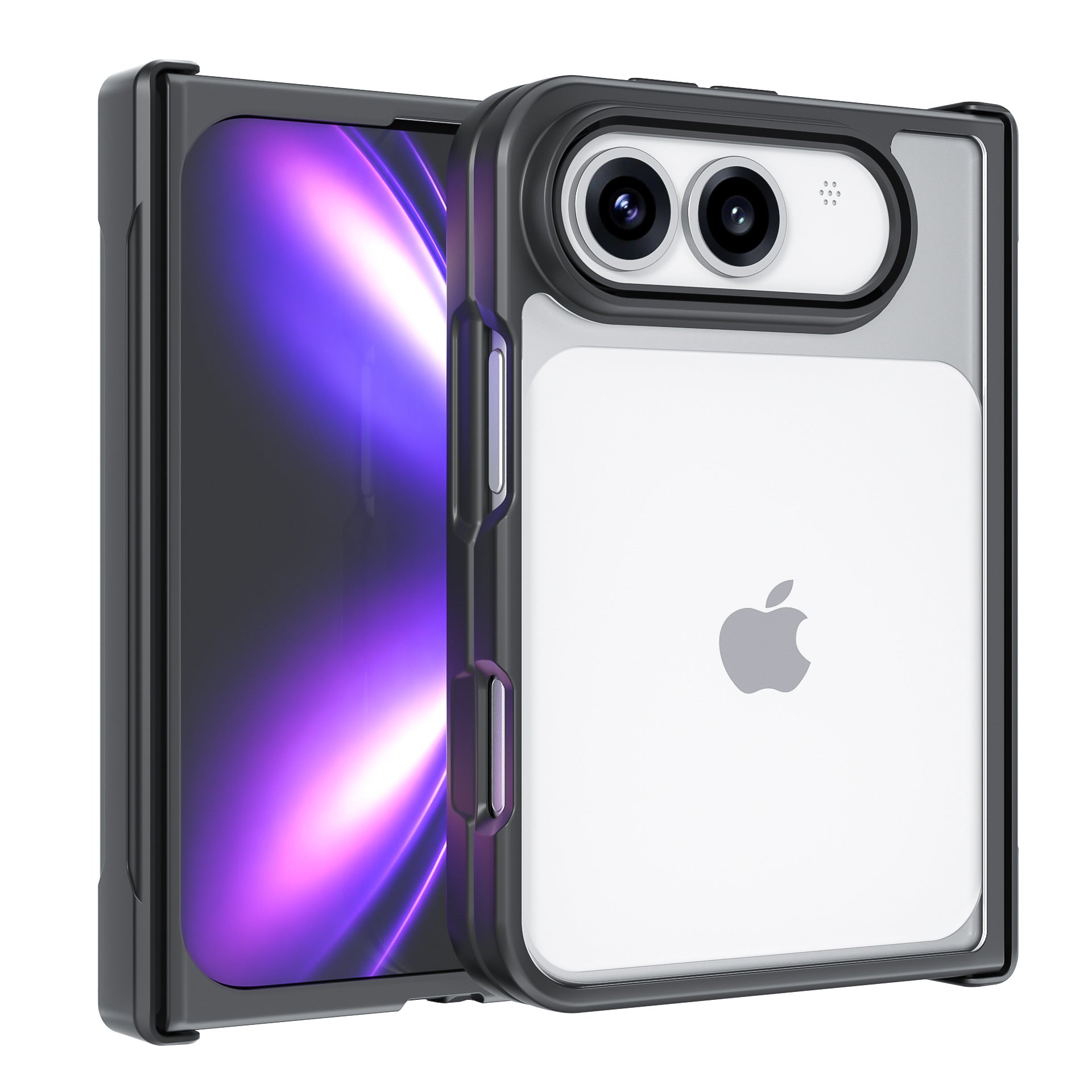
ZEERA FoldGuard Case for iPhone Ultra – 360° Full Protection
- Protects both screens and hinge
- Shock-absorbing TPU frame
- Durable PC backplate
- Optional N52 MagSafe
- Optional 360° stand
FAQ
Why is my iPhone 18 Pro Max hot during setup?
Initial setup can run software updates, data transfer, iCloud restoration, app downloads and system indexing at the same time. Apple says first-time setup and restoring from a backup can normally make an iPhone warmer.
Is iPhone 18 Pro Max overheating during Quick Start normal?
Some temporary warmth can be normal. It becomes more concerning if the device remains extremely hot after setup has finished or repeatedly displays a temperature warning.
Can heat pause an iCloud restore?
Yes. Apple says iCloud Restore can temporarily pause if an iPhone becomes too hot and will continue after the device cools down.
Can overheating make iPhone data transfer slower?
Potentially. Excessive heat can trigger thermal protection and an iCloud restore can pause entirely until the phone cools. Cooling does not increase network speed, but it can help prevent heat from becoming a bottleneck.
Can I charge my iPhone 18 Pro Max while transferring data?
Yes. Keeping the phone powered can be useful during a large migration, but charging adds heat. Active cooling can be useful if you want to charge and restore the phone simultaneously.
Can the ZEERA SuVolt Gen5 Qi2.2 Active Cooling Car Charger speed up an iPhone transfer?
The ZEERA SuVolt Gen5 Qi2.2 Active Cooling Car Charger does not increase Wi-Fi or iCloud speed. Its active cooling can instead help reduce excessive heat that might otherwise trigger slower charging, thermal management or an iCloud Restore pause.
Can iOS 27 make the iPhone 18 Pro Max hot?
A major iOS update can temporarily increase device temperature while background optimization and indexing continue. As of August 21, iOS 27 is still in beta testing, so a widespread iPhone 18 Pro Max iOS 27 overheating problem has not been established.
Can overheating damage iPhone battery health?
Long-term exposure to excessive heat can shorten battery lifespan. Apple warns that using an iPhone in very hot conditions can permanently shorten battery life.
Why is my iPhone still hot after Quick Start?
Photos analysis, app downloads, Spotlight indexing and iCloud synchronization can continue after the visible Quick Start process is complete.
How long should an iPhone stay hot after setup?
There is no fixed duration because it depends on the size of the restore. The important sign is that the phone should gradually cool as downloads and background processing finish.
Is iPhone 18 Pro Max overheating a confirmed problem?
No. As of August 21, 2026, the iPhone 18 Pro Max has not officially launched, so there is currently no evidence establishing a widespread production-device overheating defect.
Sources and Evidence Status
Apple Support: Apple's iPhone temperature guidance confirms that first-time setup, restoring a backup, major software updates and wireless charging can make an iPhone warmer. Apple also documents temperature-related charging limitations and temporary iCloud Restore pauses.
Apple Developer: iOS 27 beta 5 was released on August 10, 2026 and remains the current listed iOS 27 beta as of this article's August 21 update.
Launch status: The iPhone 18 Pro Max is expected as part of Apple's September 2026 premium iPhone lineup, but Apple has not officially launched the device as of this update.


